Toolbox and Skill System
Toolbox (MCP)
Loomy's toolbox allows AI to connect to and use various external tools, greatly expanding the boundaries of AI capabilities. By configuring MCP (Model Context Protocol) services, Loomy can read operational data, execute real actions, retrieve real-time information, and connect workflows.
Access Toolbox Settings Click "Settings" on the left menu bar of the application, and then select the "Toolbox" option to enter the toolbox configuration page.
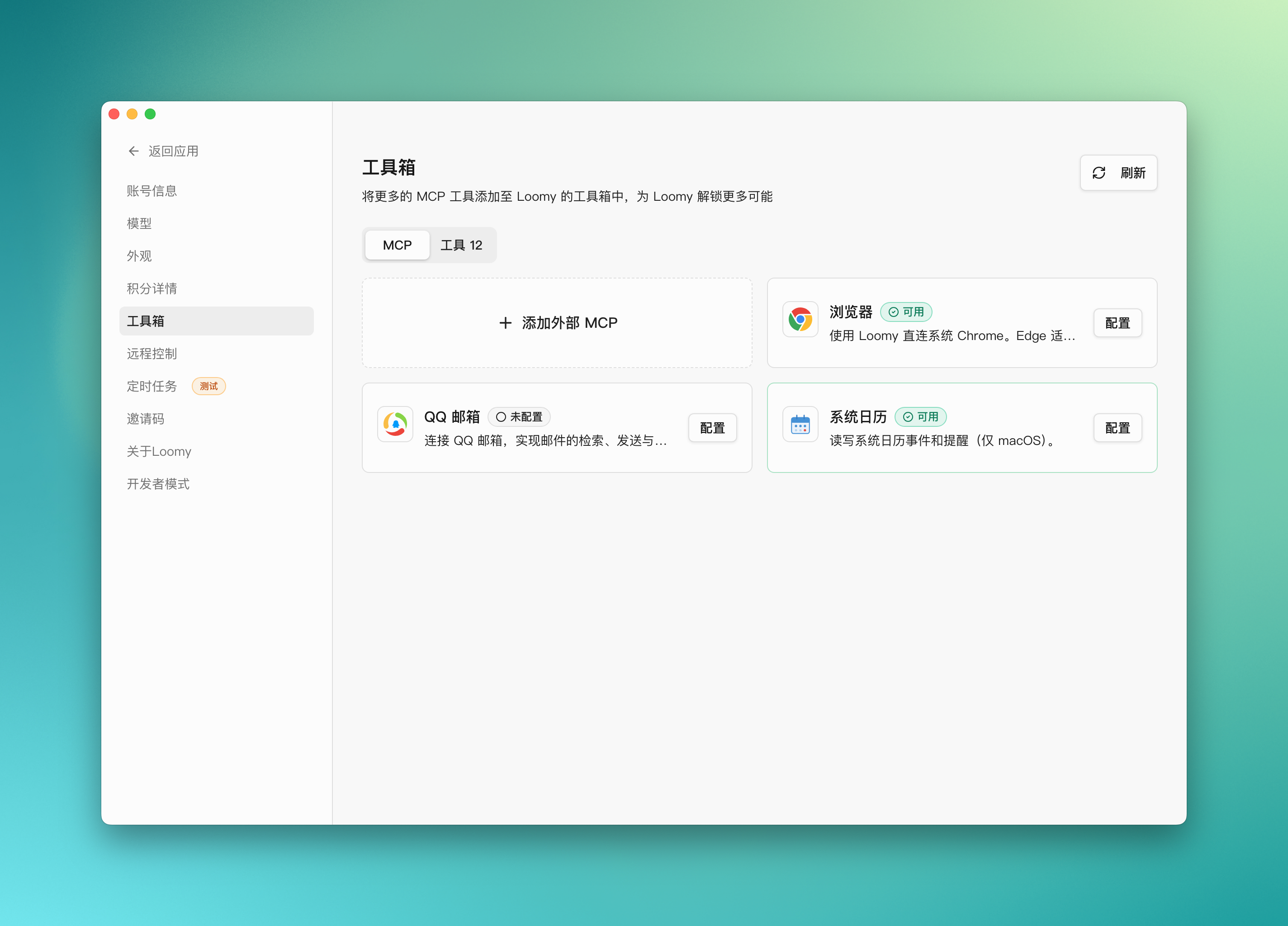
Built-in MCP Services
- Browser MCP - Allows AI to control the browser to access web pages and extract information
- QQ Mail MCP - Connects to QQ Mail to read and send emails
- System Calendar MCP - Manages the system calendar to create and query schedules
You can add external custom MCP configuration files at any time in "Settings" -> "Toolbox".
Configuration Example: QQ Mail MCP
The following takes configuring QQ Mail MCP as an example to demonstrate how to configure and use the toolbox function.
1. Configure Mailbox Information Click the "Configure" button on the right side of the "QQ Mail MCP" card and fill in the following information:
- Mailbox Account: Your QQ email address (e.g., example@qq.com)
- Authorization Code: The authorization code for QQ Mail (not your QQ password)
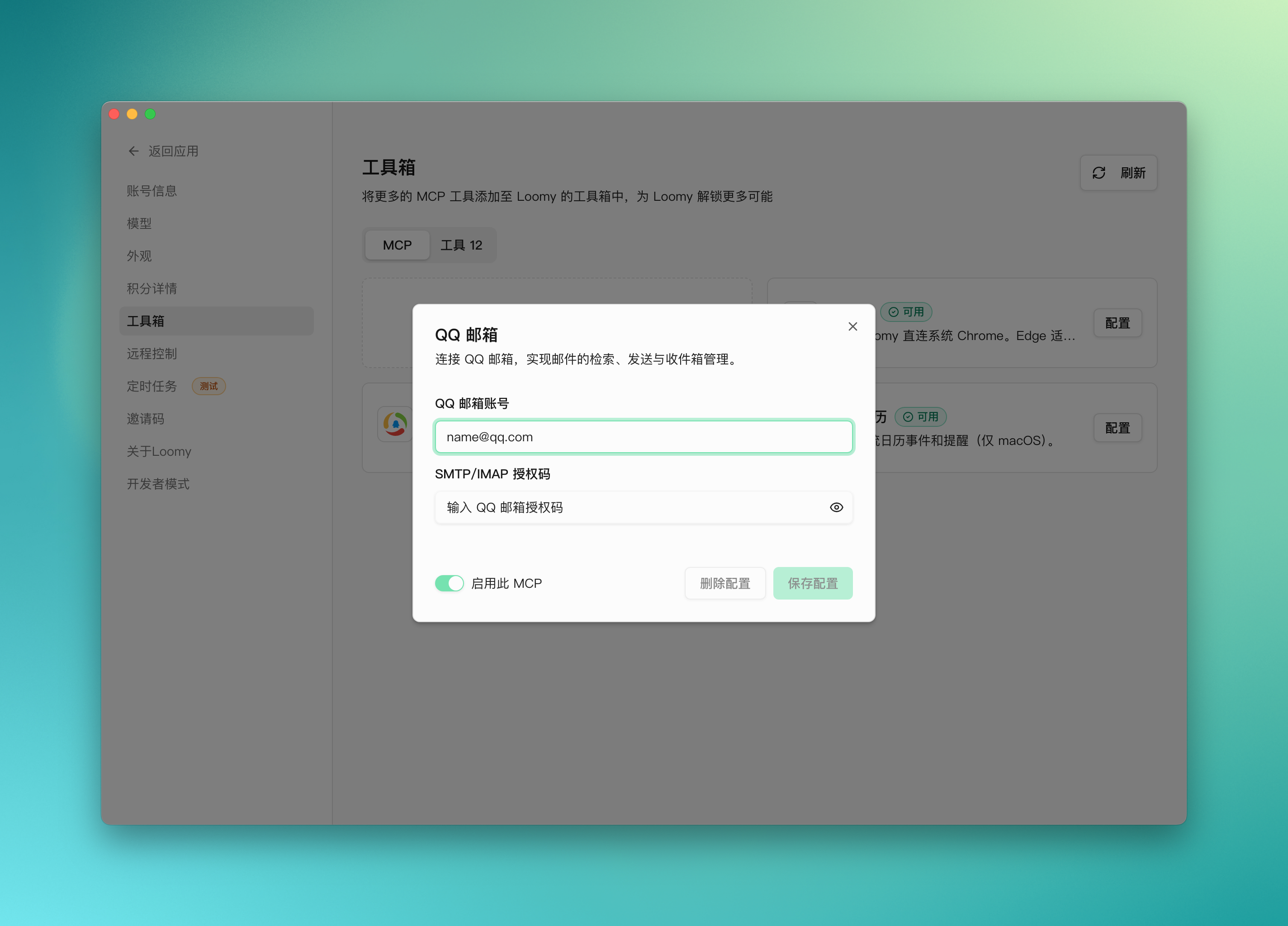
After the configuration is complete, the status will show as "Configured".
2. Usage Scenario Example After configuration, you can ask Loomy to help you handle email-related tasks through natural language.
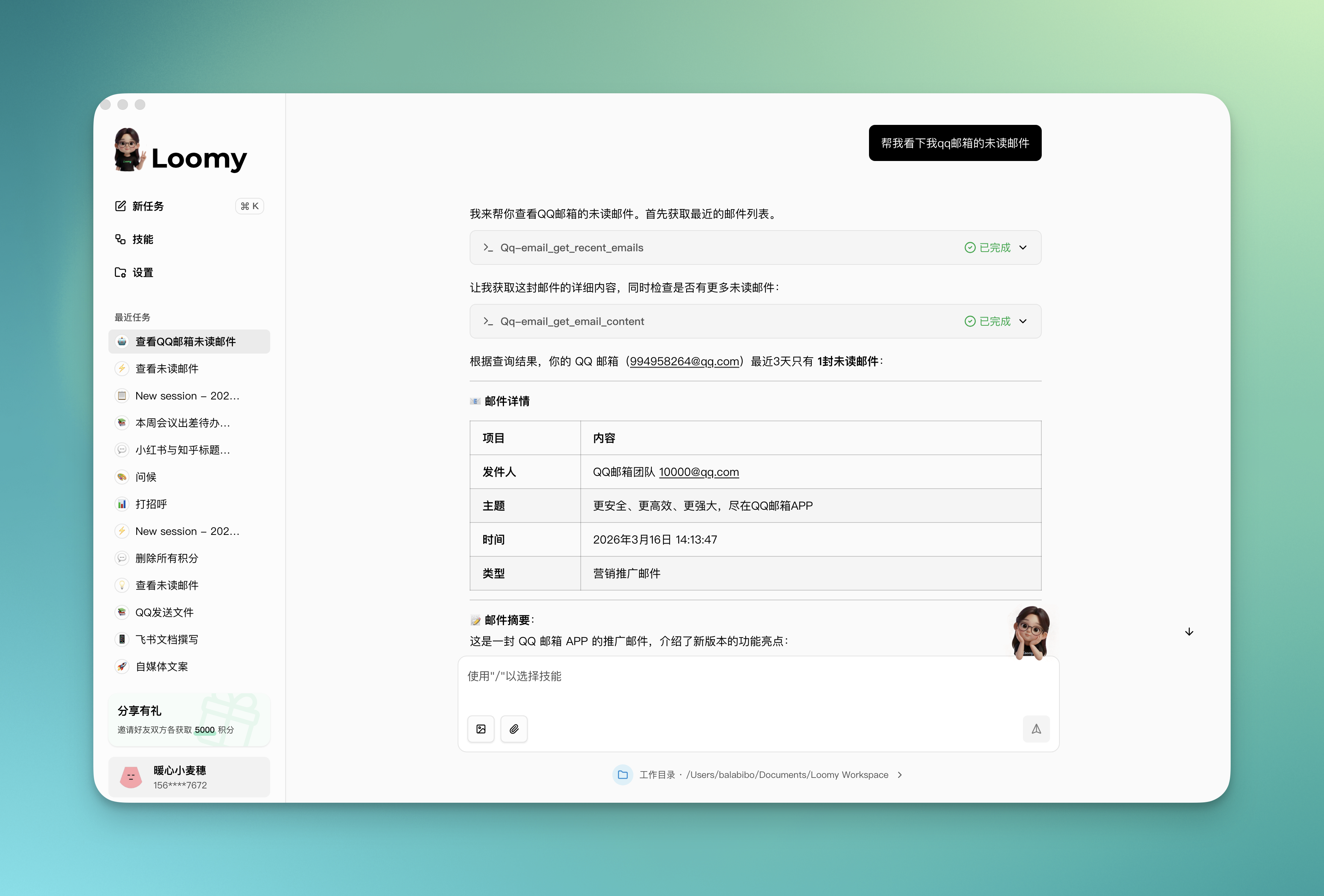
Scenario 1: Check Unread Emails Create a new task and send a message:
Help me check my recent unread emails
Loomy will automatically connect to your QQ mailbox, get unread emails from the past three days, and display them to you.
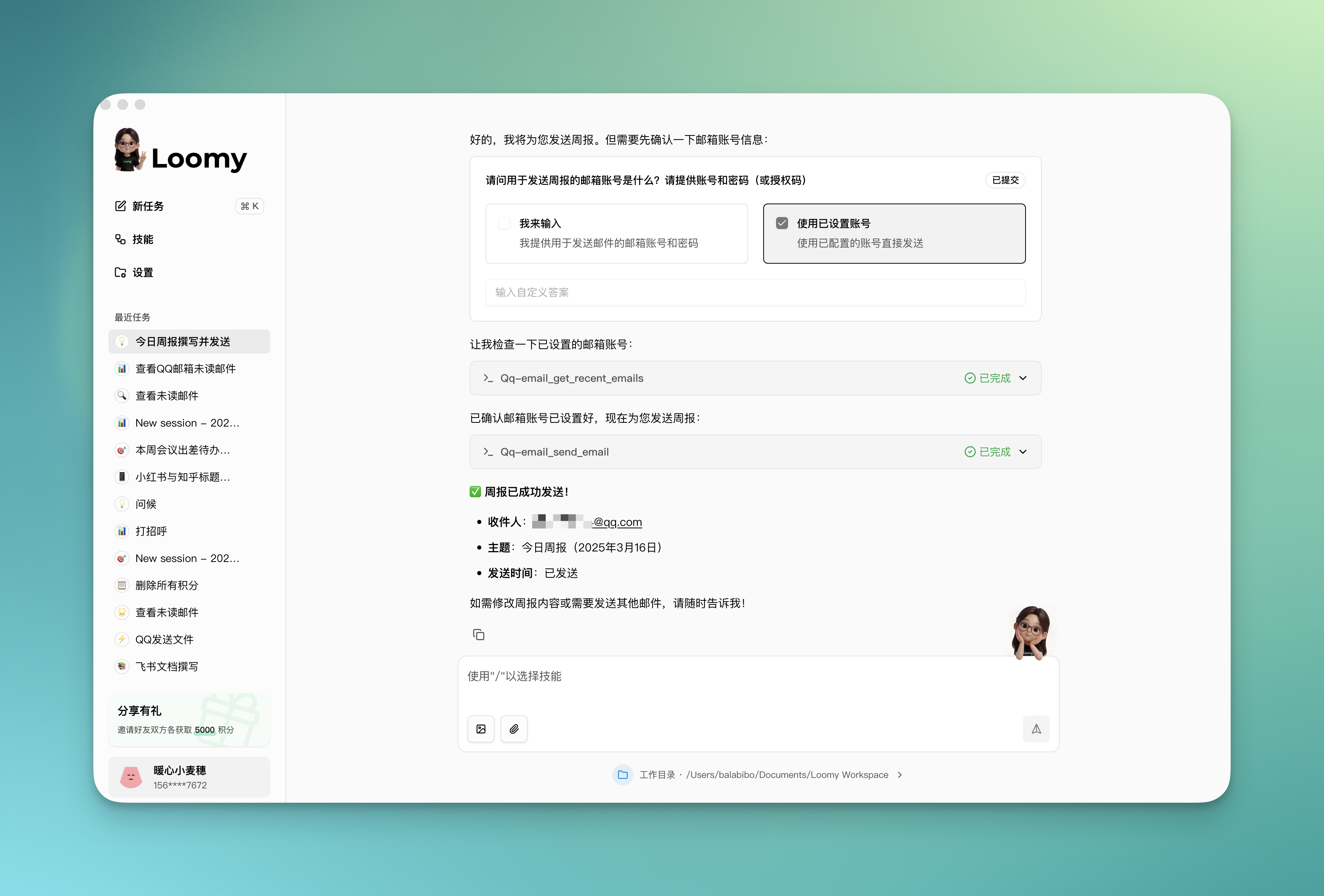
Scenario 2: Write and Send Emails You can also ask Loomy to help you write and send emails:
Help me write today's weekly report and send it to my boss
Loomy will generate a weekly report based on your work content and send it to the designated recipient via QQ Mail.
Frequently Asked Questions
How to get the QQ Mail authorization code? The QQ Mail authorization code is a dedicated password used for third-party client logins. The steps to get it are as follows:
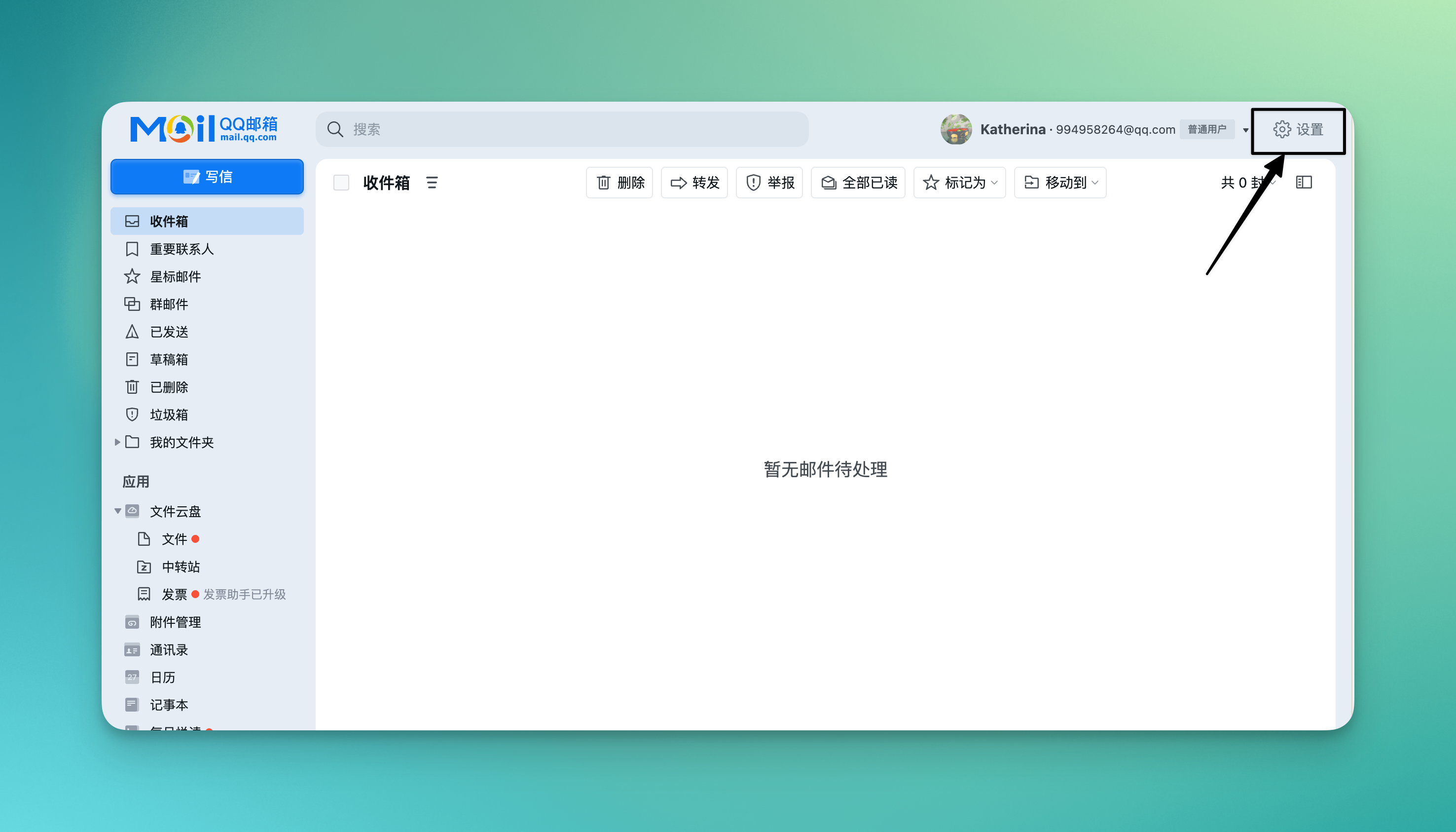
Step 1: Enter the settings page. After logging in to QQ Mail, click the "Settings" button in the upper right corner.
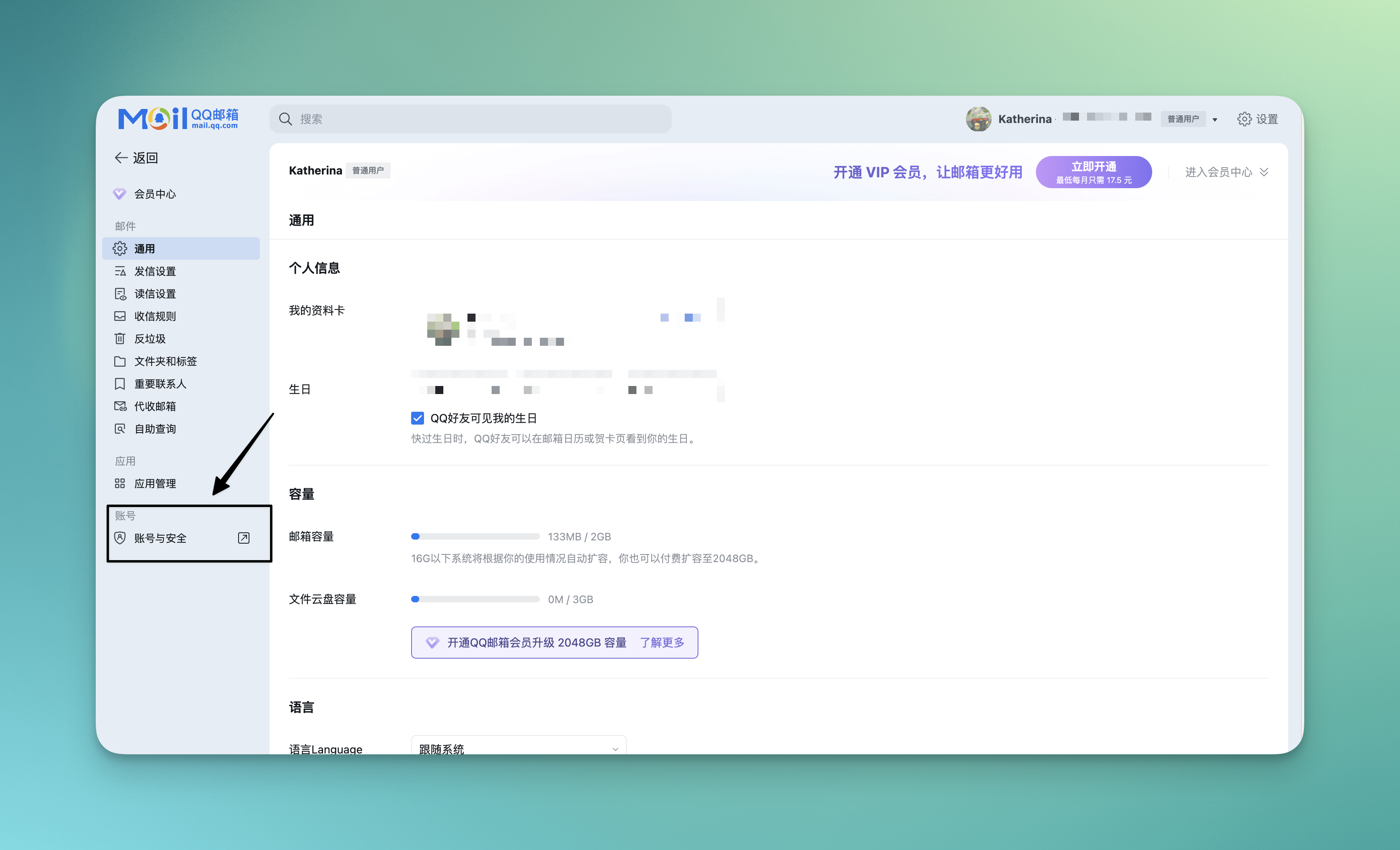
Step 2: Enter Account and Security. On the settings page, click the "Account and Security" option in the lower left corner.
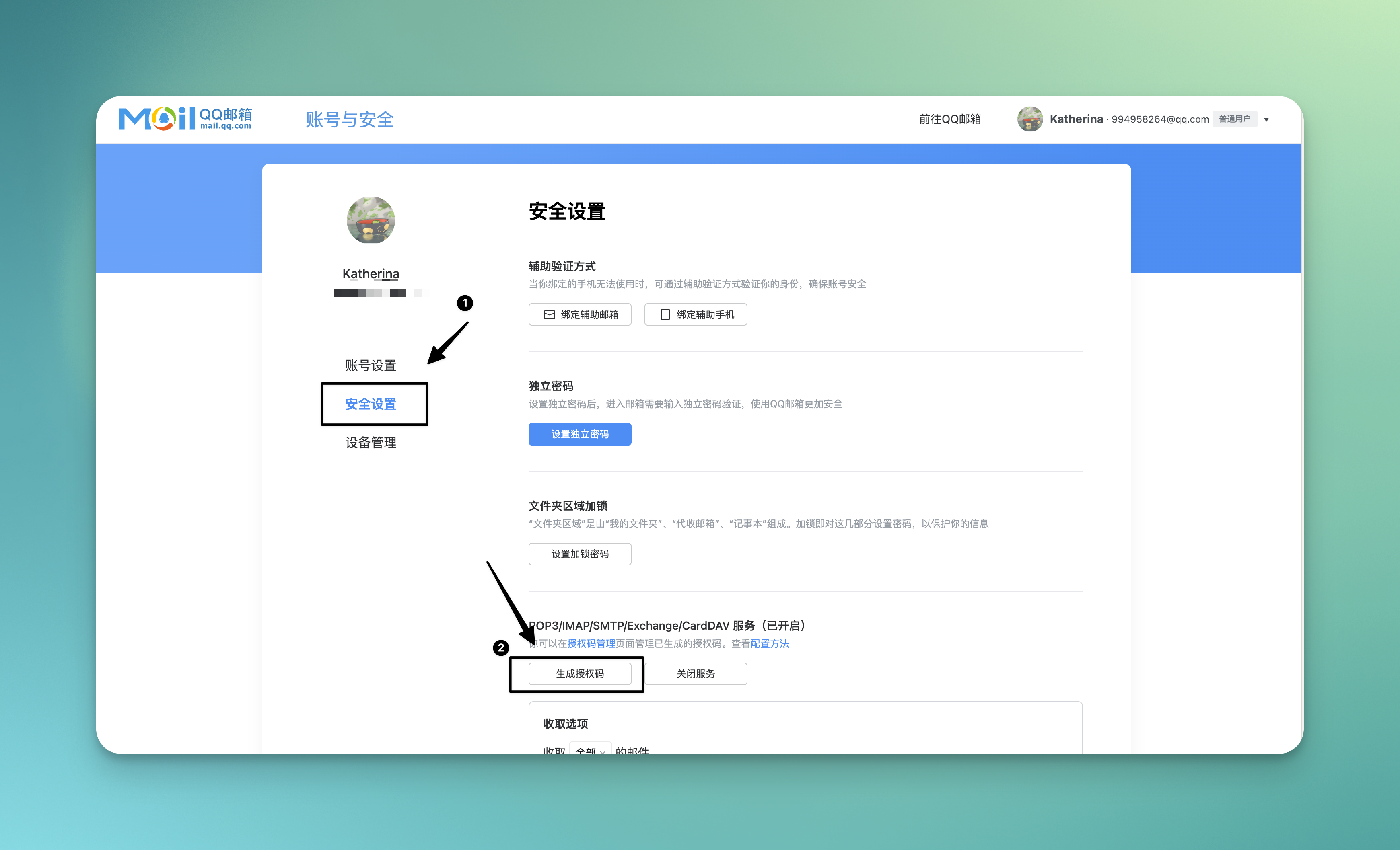
Step 3: Enter Security Management. On the Account and Security page, select "Security Management".
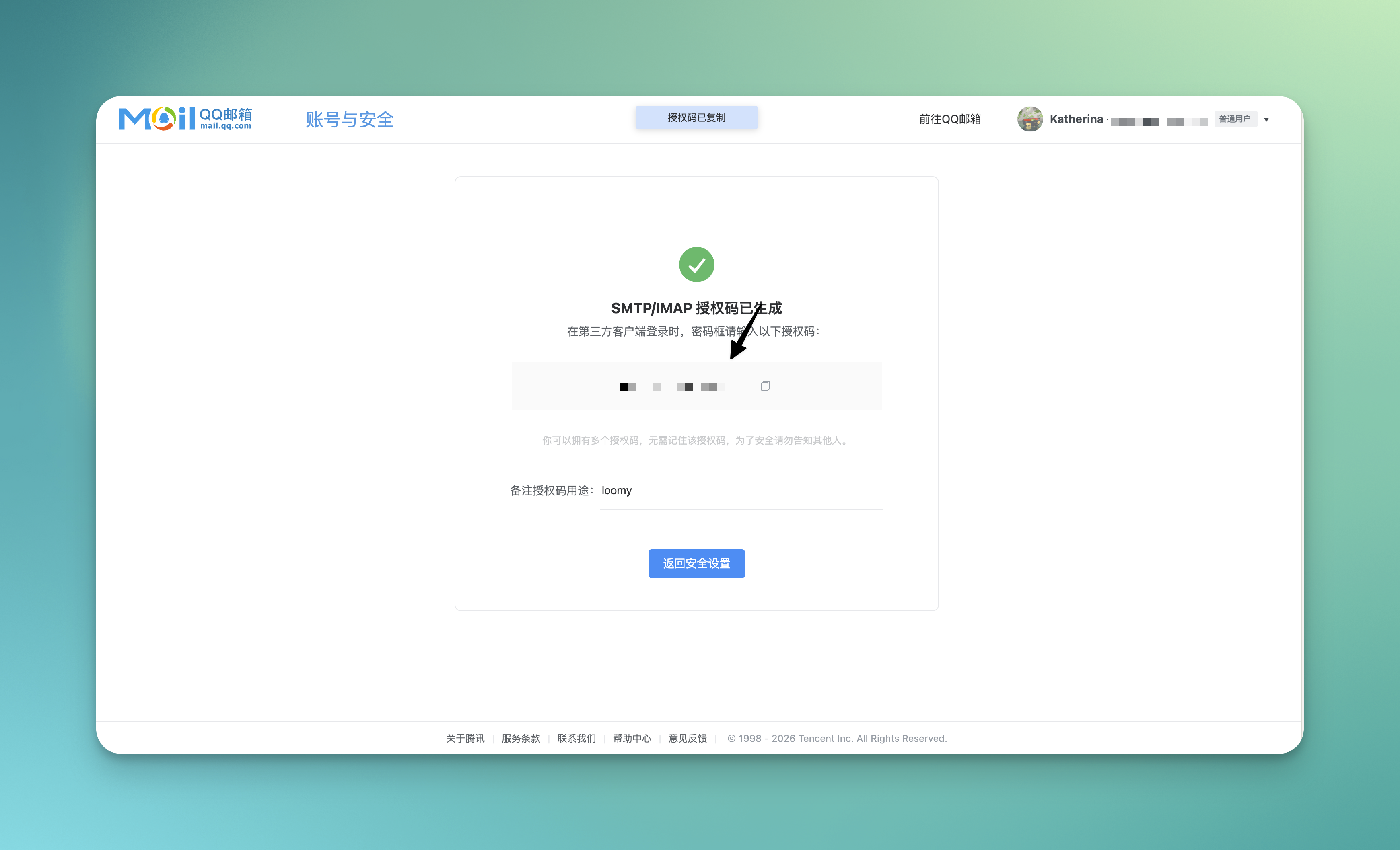
Step 4: Generate Authorization Code. Click the "Add Authorization Code" button. After completing the verification according to the prompts, the system will generate an authorization code.
Note:
- The authorization code will only be displayed once, please keep it safe
- The authorization code is not your QQ password, but a password specifically for third-party app logins
- If you forget the authorization code, you can delete it and generate a new one
Skill System (Skills)
Loomy's skill system gives AI more professional capabilities to help you complete tasks in various office and life scenarios. From writing emails and processing spreadsheets to Xiaohongshu operations and stock analysis, every skill is an "ability" of the AI.
What is a Skill?
Skills can be understood as the "professional abilities" mastered by large models. Every time you install a skill, it is equivalent to adding an ability to the AI. If you compare a large model to a person, skills are what this person can do. The more skills you install, the more tasks AI can help you complete.
For example: As a Xiaohongshu self-media operator, you want AI to write a Xiaohongshu advertorial. After installing the "Xiaohongshu Card Generator" skill, AI can output professional content according to Xiaohongshu's style and requirements.
Where to find Skills?
Click the "Skills" entry in the left menu bar of Loomy to view all official built-in skills.
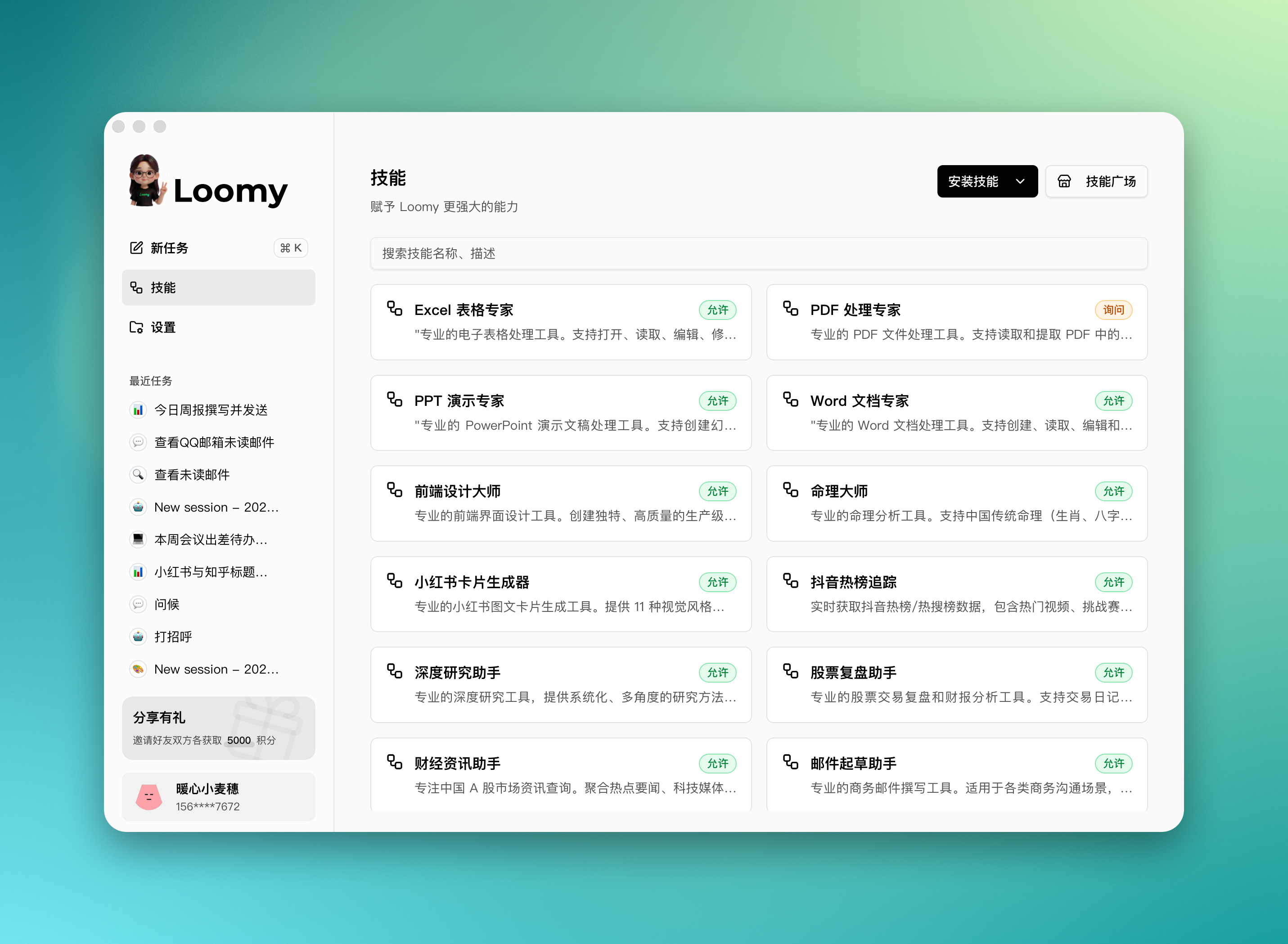
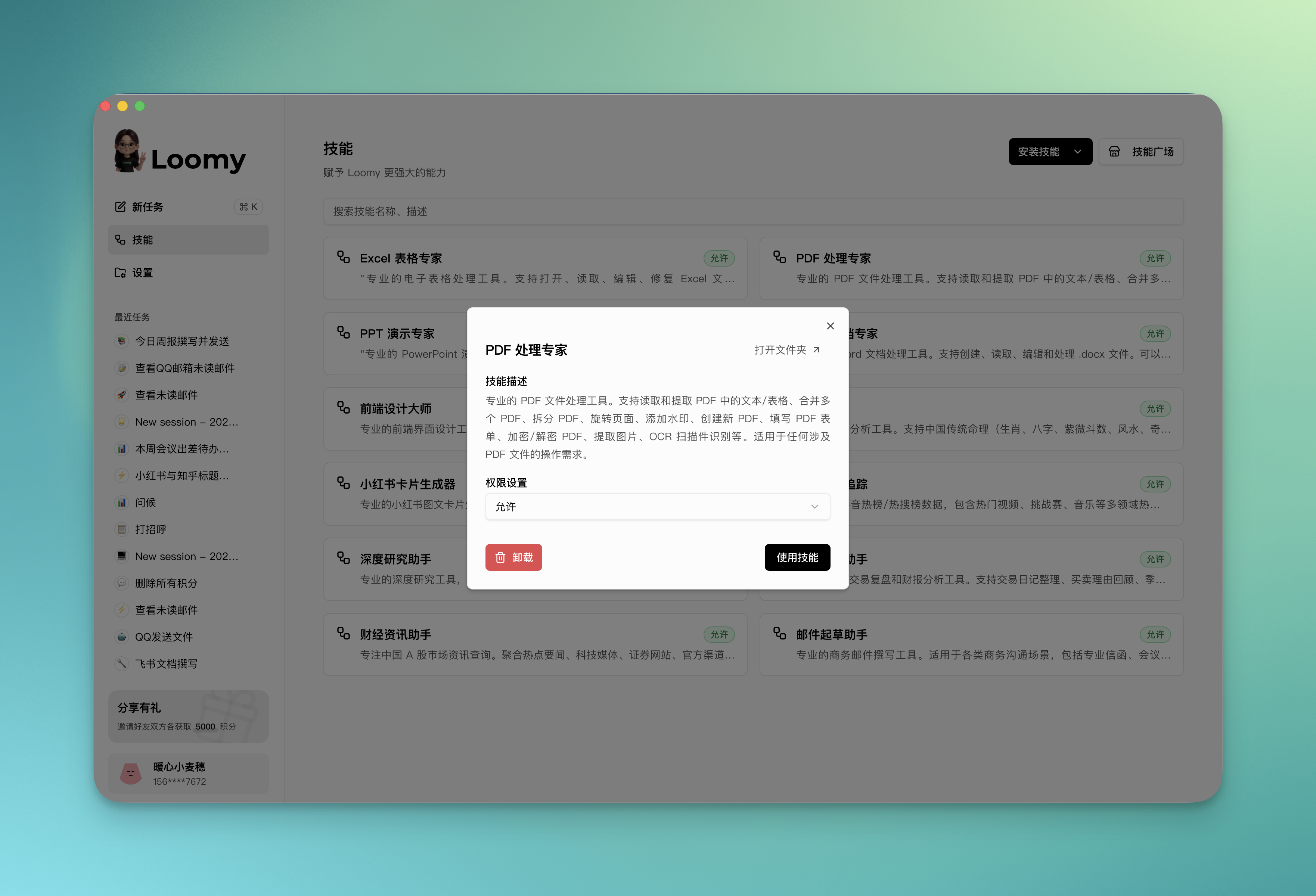
Click on any skill card to view the detailed description of the skill and set the AI's permission to call the skill. Permissions are divided into three types:
| Permission | Description |
|---|---|
| Allow | AI uses it directly when it judges it is necessary, without confirmation |
| Ask | AI will ask you for your consent before calling, and will only execute after confirmation |
| Forbid | Completely disable the skill, AI will not call it |
It is recommended to set "Allow" for frequently used everyday skills and "Ask" for skills involving sensitive operations, such as sending emails. This maintains efficiency while preserving control over key operations.
How to use Skills?
Loomy provides two ways to use skills, making your work more flexible and efficient.
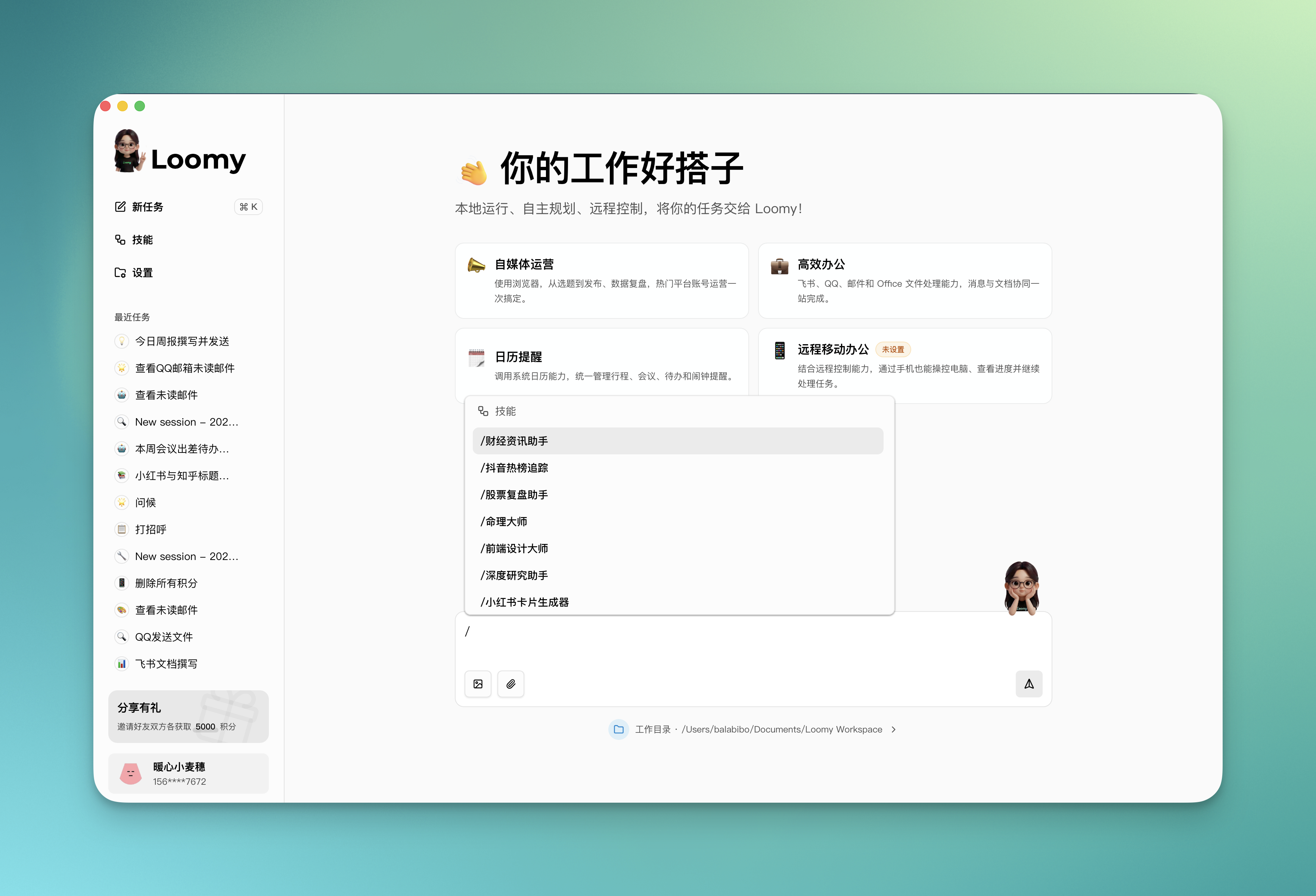
Method 1: Shortcut Command "/" Enter / in the dialog box, and a skill selection menu will automatically pop up. After selecting the required skill and sending a message, AI will call the skill to complete the task.
Method 2: AI Autonomous Recognition No need to manually select, AI will automatically search for matches among installed skills based on your input content, and automatically call the corresponding skill to complete the task after successful recognition.
- When you say "Help me write a business email", AI will automatically call the "Email Drafting Assistant"
- When you say "Analyze this Excel spreadsheet", AI will automatically call the "Excel Spreadsheet Expert"
Official Recommended Skills
Office Documents
- Word Document Expert: Professional Word document processing tool. Supports creating, reading, editing, and processing .docx files.
- Excel Spreadsheet Expert: Professional spreadsheet processing tool. Supports opening, reading, editing, and repairing Excel files.
- PPT Presentation Expert: Professional PowerPoint presentation processing tool. Supports creating slides, reading, and extracting .pptx file content.
- PDF Processing Expert: Professional PDF file processing tool. Supports reading and extracting text/tables in PDFs, merging/splitting PDFs, OCR recognition, etc.
Business Communication
- Email Drafting Assistant: Professional business email writing tool. Provides a structured email framework and multiple tone options.
Content Creation
- Xiaohongshu Card Generator: Professional Xiaohongshu image and text card generation tool. Provides 11 visual styles and 8 layout schemes.
- Frontend Design Master: Professional frontend interface design tool. Create unique, high-quality production-grade frontend interfaces.
Finance and Investment
- Financial News Assistant: Focuses on Chinese A-share market news queries. Aggregates hot news and multi-source information.
- Stock Review Assistant: Professional stock trading review and financial report analysis tool.
Hotspot Tracking
- Douyin Hot List Tracking: Get real-time Douyin hot list/hot search list data, providing titles, heat values, jump links, and cover images.
Research and Analysis
- In-depth Research Assistant: Professional in-depth research tool, providing systematic and multi-angle research methods.
Life and Entertainment
- Numerology Master: Professional numerology analysis tool. Supports traditional Chinese numerology and Western horoscopes.
Frequently Asked Questions
How to know which skill the AI used? When AI calls a skill, the skill name and calling status will be displayed in the conversation. You can clearly see which skill the AI is using to complete the task.
Can I disable or delete installed skills? Yes. Find the corresponding skill card in the skill list and click "Disable". After disabling, AI will not be able to use the skill, but you can re-enable it at any time.
Do skills consume extra points? Skills themselves are not charged extra, but using skills will consume conversation points normally. Different skills have different complexities, and the points consumed will also vary.